Lead-ops pipeline you can break on purpose
Submit a test lead and watch it go through the same steps a real small-business pipeline runs: validate, dedupe, enrich, score, write to the CRM, alert the owner, send an instant reply. Then switch the CRM off and watch what happens when things fail.
This is a demo build, not a client project. The CRM, Slack and email steps are simulated. Nothing is sent to the address you type. The server keeps only a one-way hash of the email for 24 hours, used to catch duplicates. Your recent runs stay in your own browser.
1. Submit a test lead
3. Execution log
idleSubmit a lead to see each step, its timing, and what it decided. Try the sample lead, submit it twice, then flip CRM is down.
Recent runs
Your last 10 runs, saved in this browser only. Click one to view its log.
- No runs yet.
Dead-letter queue
0Leads that failed are parked here, not lost. Replay runs a parked lead through the whole pipeline again using the CRM setting above, so switch the CRM back to healthy first. Leads that failed validation need a fix, so they get Edit & resubmit.
- Empty. Flip “CRM is down” or “Invalid email” and submit to fill it.
Walkthrough: what each step does, and why a small business cares
Screenshots are from this demo page.
-
Validate & normalize
Trims spaces, fixes name casing, lower-cases the email, turns “(215) 555-0142” into
+12155550142. Bad emails are stopped here.Why it matters: one typo'd email means your follow-up bounces and the lead goes quiet. Clean phone numbers mean SMS and click-to-call actually work.
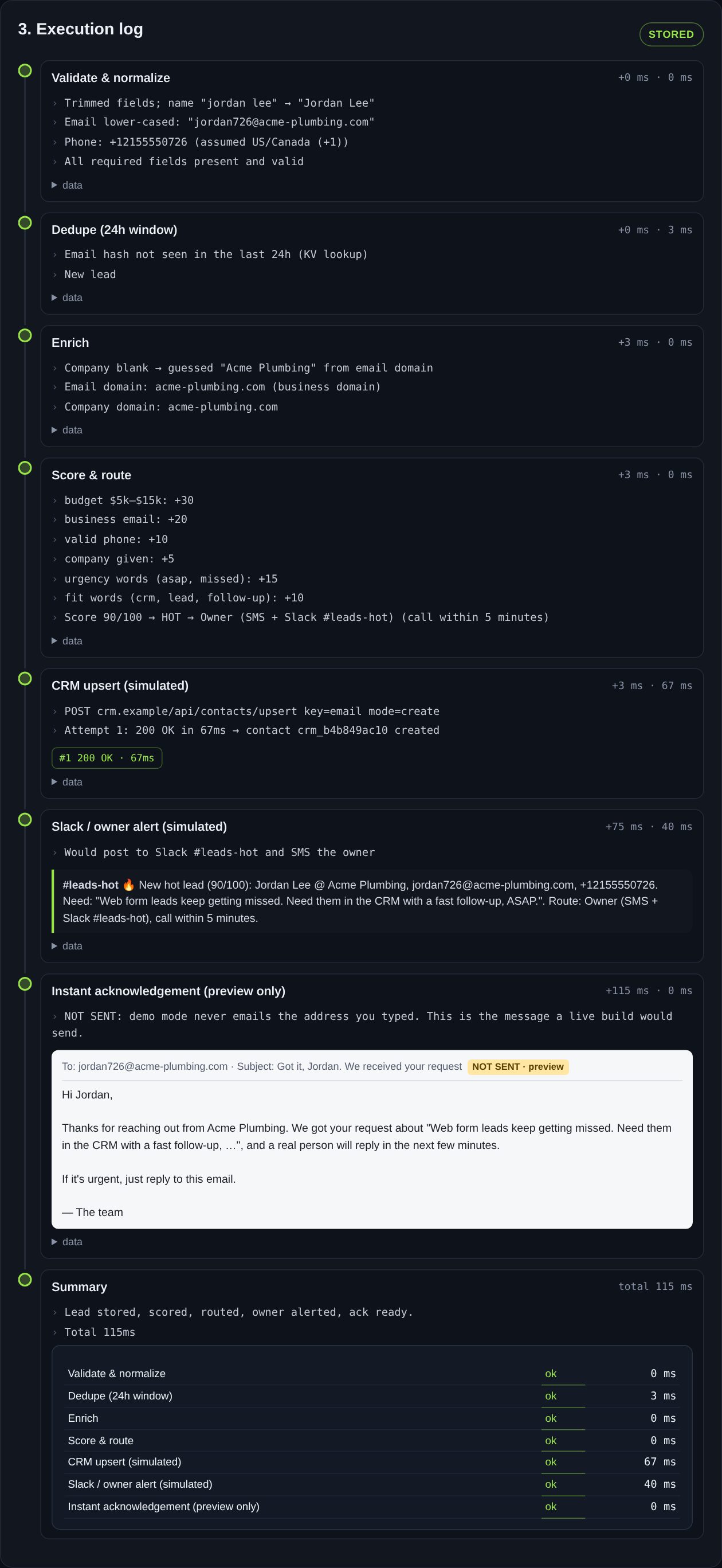
A clean run: every step green, with timings. -
Dedupe
The same email within 24 hours is flagged. The CRM record is updated, not doubled, and the owner alert and auto-reply are skipped.
Why it matters: people hit “submit” twice or fill two forms. Without dedupe you get double CRM entries, two reps calling the same person, and a prospect who gets two identical emails.
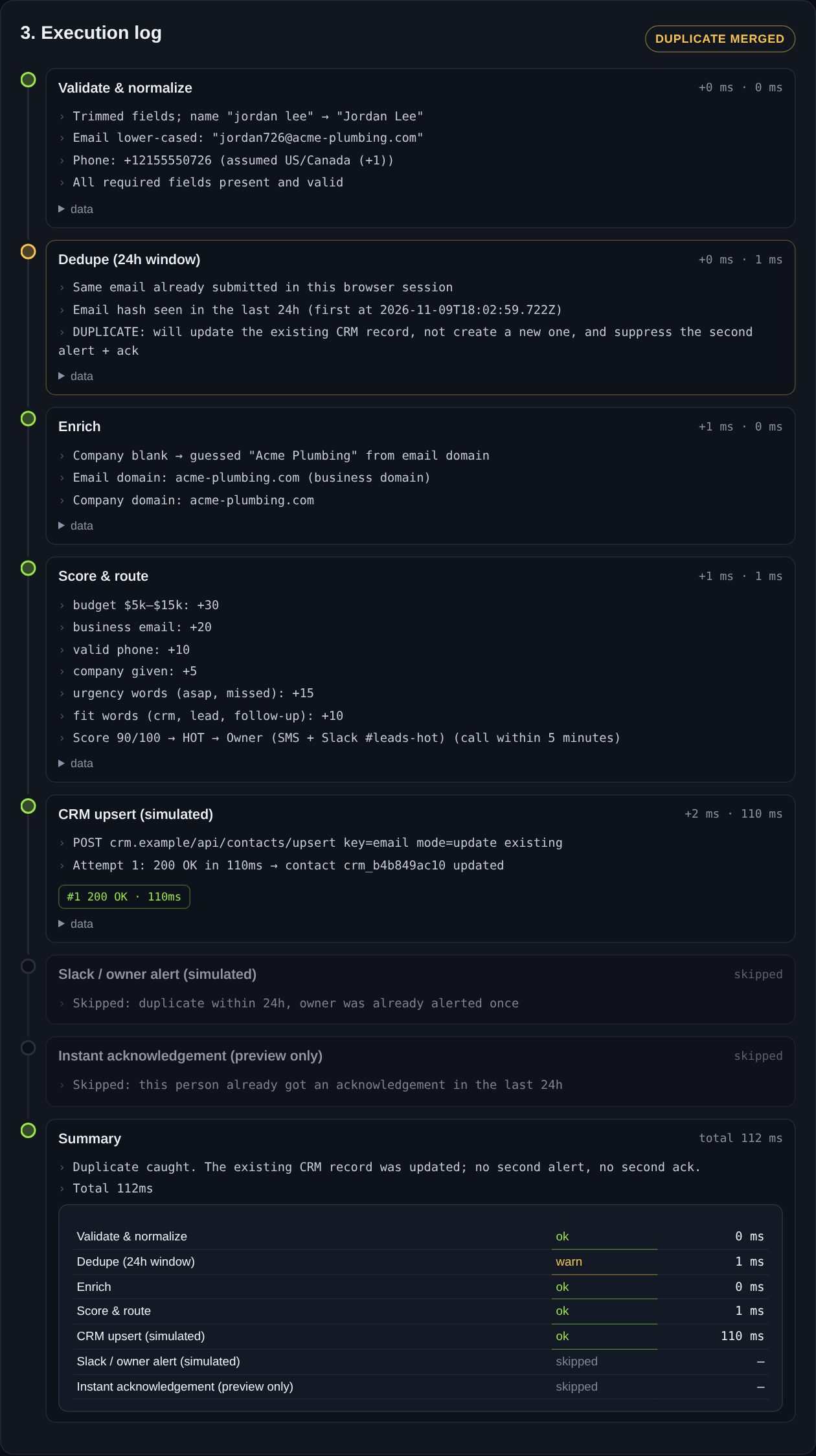
Same lead twice: merged, no second alert. -
Enrich, score & route
Pulls the company domain from the email, marks free vs. business email, then scores the lead from budget, urgency and fit, and picks hot, warm or cold with an owner and a response target.
Why it matters: the $15k “we need this fixed this week” lead should reach the owner's phone in minutes, not sit behind a $300 tire-kicker in a shared inbox.
-
CRM write with retries
CRMs time out and rate-limit. The upsert retries with exponential backoff (about 250 ms, 500 ms, then 1 s) before giving up.
Why it matters: a 30-second CRM hiccup shouldn't cost you a lead. With retries, the visitor never notices the outage.
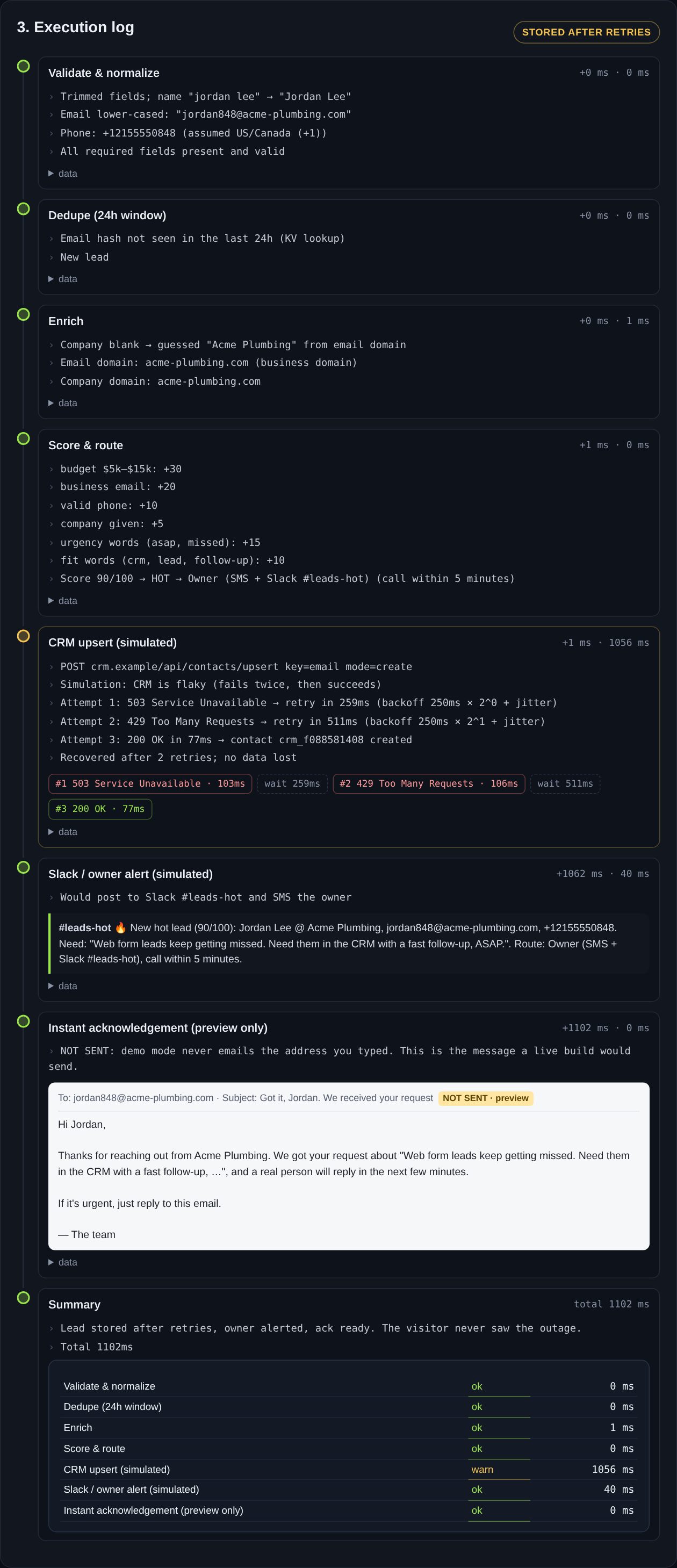
Flaky CRM: two failures, backoff, success. -
Error branch: dead-letter queue + owner alert
If the CRM stays down, the lead is parked in a dead-letter queue with the reason, and the owner gets an alert. When the CRM is back, one click replays it.
Why it matters: the costly failure is the silent one, where a form “worked” but the lead never landed anywhere. Here every failure is visible and recoverable.
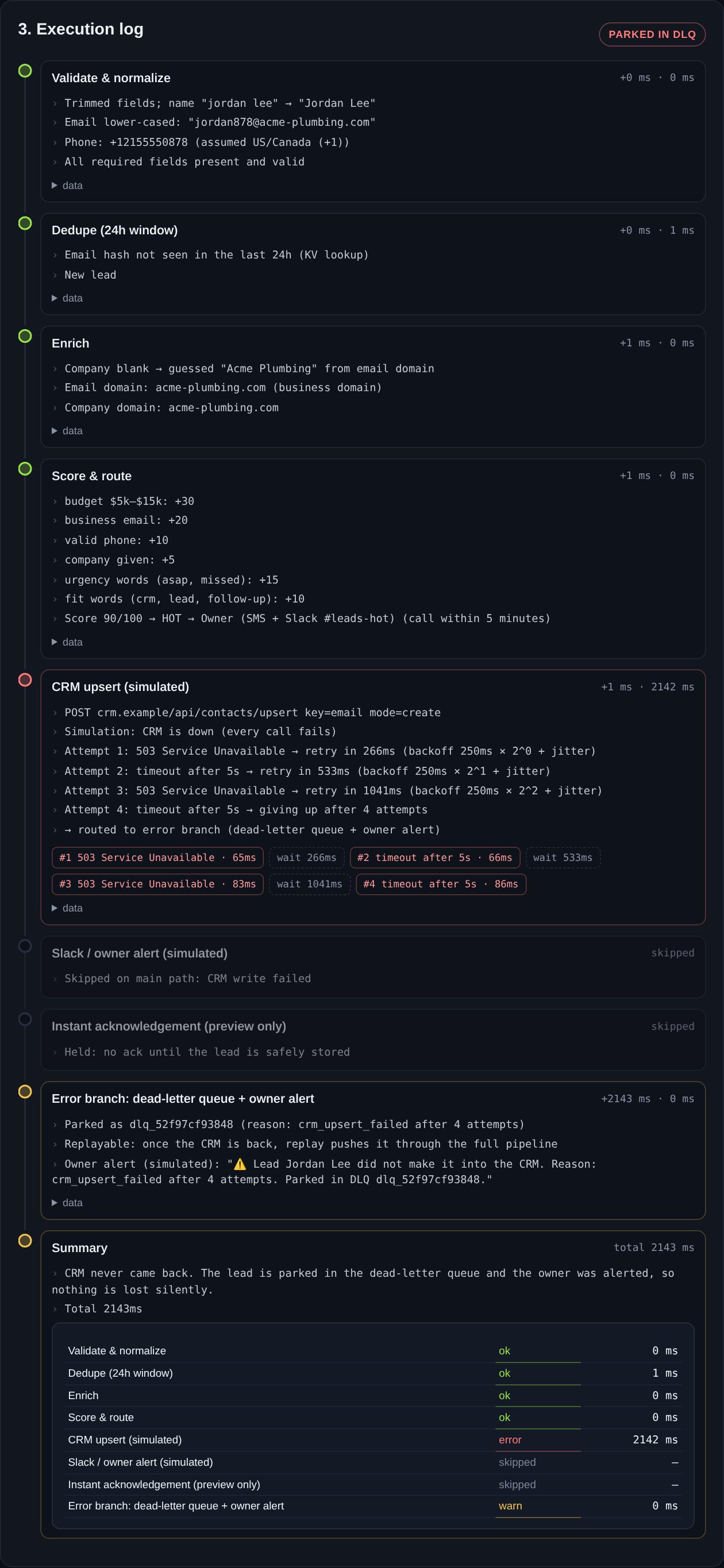
CRM down: parked in the DLQ, owner told. -
Owner alert + instant acknowledgement
A short Slack or SMS alert with the score and route, plus an instant reply to the lead. The demo shows the reply it would send and never actually sends it.
Why it matters: the first business to answer usually wins the job. An instant “we got it, a real person will call” buys you time to call back.
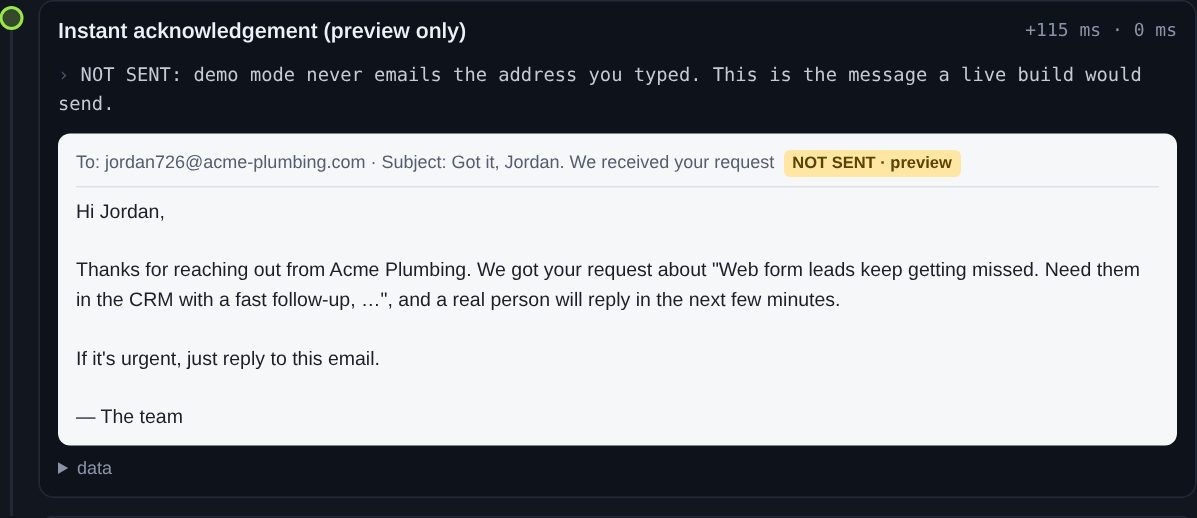
The ack that would go out (preview only). -
Replay from the dead-letter queue
Switch the CRM back to healthy and press Replay. The parked lead runs through every step again and is cleared from the queue.
Why it matters: recovering from an outage takes one click instead of digging through form exports and inboxes.
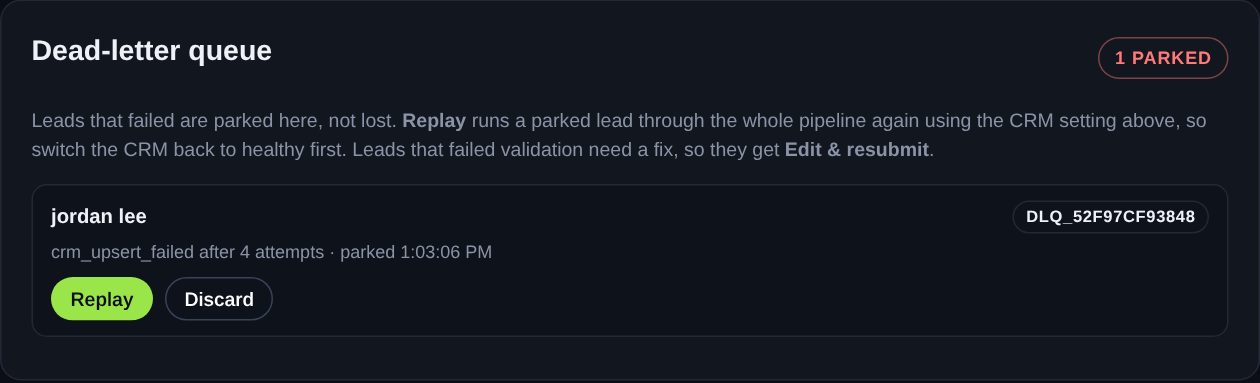
A parked lead, ready to replay.
Get the workflow
The same flow as an importable n8n workflow. In n8n, open Workflows → Import from File, swap in your own credentials, and activate it.
- Placeholder credentials and URLs only (
YOUR-CRM.example.com, aREPLACE_WITH_GOOGLE_SHEET_IDsheet, Slack and SMTP placeholders). No keys inside. - Tested by importing it into n8n 2.46.7 and running it against a mock CRM: clean lead, duplicate, flaky CRM (recovered on try 3), CRM down (parked, HTTP 202) and invalid email (parked).
- One honest difference: n8n's built-in retry waits a fixed time between tries (set to 2 s, up to 4 tries). The demo above shows exponential backoff. To get exponential backoff in n8n, swap the built-in retry for a Wait node in a loop.
- Dedupe uses workflow static data, which n8n saves only on production (active) runs. With several workers, look the email up in the CRM instead.
Using Make instead?
Same design, as a Make scenario. This is a description, not a blueprint file:
- Webhooks › Custom webhook receives the form post.
- Tools › Set multiple variables trims fields, lower-cases the email, and builds E.164 with
replace(). A filter on the next route checks the email against a regex. - Data store › Search records (key = email, plus a timestamp) for the 24h dedupe, and Add/replace a record after the CRM write.
- Router: hot / warm / cold filters on a score you compute in Set variables (budget, business email, urgency words).
- HTTP › Make a request (or your CRM's own module) for the upsert, with a Break error handler set to retry (Make retries on a fixed interval) and “store incomplete executions” turned on.
- On final failure, the error route goes to Google Sheets › Add a row (DLQ) plus a Slack owner alert. On success, the Slack alert and Email › Send the ack.
Want this wired into your stack?
Fixed-price builds from $250. Your form, your CRM, your alerts, with the same error handling shown above. Email maxassist99@gmail.com.
Max Oliver, Consultant · MaxAssist99
This page is a demo build made to show how the pipeline works. It does not describe any client project or results.